This site contains the documentation for the
opensimula project. Github site 
opensimula is a component-based time simulation environment in Python.
The main objective is the thermal and energy simulation of different systems and installations, mainly in buildings, although it can be used to simulate any component that presents a temporal variation.
Structure
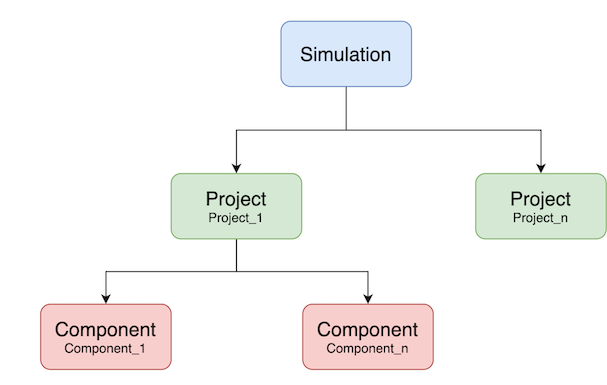
The general object structure provided by opensimula is composed of three main elements:
- Simulation: The global environment for simulation.
- Project: A set of components that define a problem that can be temporarily simulated.
- Component: These are the base elements on which the simulation is performed. The types of components currently available can be consulted in section Component list.
Parameters
Parameters are used to define the characteristics that make up the projects and components.
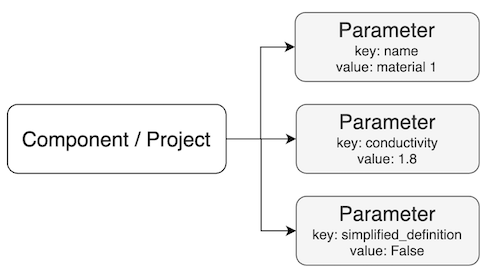
Parameters can be of different types depending on the type of information they contain (strings, boolean, integer, float, options, ...). A list of all parameter types and their possibilities can be found in the User guide. :
Variables
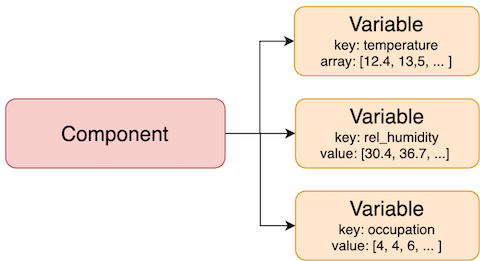
Variables are elements included in the components to store the temporal information generated during the simulation.
Documentation
Release notes
This is the list of changes to opensimula between each release. For full details, see the commit logs.
Current Version 0.8.5
- 0.8.5 (September 4, 2026): The view factors between the surfaces of a space are now closed with a symmetric scaling, F_ij = x_i * (A_j/A_total) * x_j, solved with biproportional steps and Newton over log(x). The iteration used until now only converged for a shoebox with equal opposite faces: perturbing the areas of the ASHRAE 140 case 600 by 0.1% was already enough for it to run out of its 500 iterations, and it then returned, without saying so, rows adding up to as little as 0.71 instead of 1, so up to 29% of the long wave radiation a surface emitted reached no other surface and disappeared from the surface energy balance. Every space of the two example buildings converted from HULC failed that way. Closure, each row adding up to 1, and reciprocity, A_iF_ij = A_jF_ji, are now both met to machine precision. They cannot both be met when a surface sees no other one, or when the surfaces of a single plane hold more than half of the area of the space: that is now checked before solving, reported as a warning naming the space, and the matrix falls back to closure alone rather than to a silently wrong one. Azimuths are also compared modulo 360 and with a tolerance, so surfaces of the same plane written as 180 and -180 are recognised as coplanar. Results change slightly for every building: the reference values of the tests have been updated, annual loads move by less than 0.3%.
- 0.8.4 (August 23, 2026): Editing a value in the project editor now reaches the project as you type: changing a number is a local assignment, so the component stays the same object and a variable holding it does not go stale. Only renaming, adding or removing a component, or changing its type, still needs the project rebuilt, and those wait for "apply()": the bar says what is missing and the new Apply button asks for it without leaving the editor. A value that does not satisfy the schema is not put in until it is corrected. Fixed three ways a broken reference could bring the kernel down instead of being reported: "get_all_referenced_components()" followed a reference cycle until the stack ran out, "get_building()" chased anything a surface named as its space, and the 3D view raised on a component whose space or surface did not resolve. A reference of the wrong type was already checked; it just never got the chance to say so.
- 0.8.3 (August 23, 2026): The project editor gained a 3D view of the building, under the parameter form, drawn with Plotly and loaded only when it is opened. The bottom bar chooses what to see: the parameters, the view, or both. Picking a space in the view shows only its surfaces, which is the way to see interior partitions, since from outside the exterior walls hide everything behind them; the rest of the building stays as a grey wireframe, so the space keeps its place and its size, and only the surfaces of the chosen space answer the mouse. Selection is linked both ways: a component picked in the list is painted orange in the view, and a surface clicked in the view is selected in the list. New "pro.geometry_dict()" returns the geometry as plain data, one mesh per polygon with the component and the spaces it belongs to, and "show_3D(jupyter=True)" now returns its figure instead of only drawing it.
- 0.8.2 (August 8, 2026): New interactive project editor, "pro.editor()", built on anywidget so the same widget works in Jupyter and in Marimo. It shows the components grouped by type and the parameters of the selected one as a form generated from a JSON Schema derived from the component classes, so every field carries its unit and its limits, options become dropdowns and references to other components become dropdowns of the components of the accepted types. "editor.apply()" loads the edited definition back into the project, rebuilding it from the document and leaving it untouched if the document does not satisfy the schema. New "pro.clear()" removes every component from a project, needed to reload a definition since "read_dict()" and "read_json()" add components rather than replacing them. It replaces the previous Dash table editors, "component_editor()" and "project_editor()", removing the "dash", "dash-ag-grid" and "dash-bootstrap-components" dependencies. Fixed the "Chiller_heat_pump" type name, which prevented that component from being read back from a written project.
- 0.8.1 (August 7, 2026): Faster shadow calculation, an 8-zone building went from 4m55s to 1m16s with shadow_calculation = "INSTANT". Openings flush with the edge of their surface no longer produce invalid polygons, and list parameters no longer share the list given by the caller, which broke "duplicate_component" and a second "simulate()" in the same process.
- 0.8.0 (July 29, 2026): New water side HVAC components: "Pump", "Chiller_heat_pump" and "HVAC_water_system", allowing "HVAC_SZW_system" and "HVAC_MZW_system" coils (including reheat) to be fed from a shared water loop.
- 0.7.1 (April 29, 2026): Removing "triangle" package from dependencies, updating 3D jupyter integrated view with plotly.
- 0.7.0 (April 20, 2026): Renaming DX_unit, Water_coil and Fan components, adding 3D jupyter integrated view with plotly.
- 0.6.1 (February 17, 2026): Building_surface ground-coupled "UNDERGROUND" surfeca passed ASHHRAE 140 Section 8 Tests.
- 0.6.0 (October 30, 2025): HVAC_MZW_system passed ASHHRAE 140 Tests.
- 0.5.2 (October 2, 2025): Changed the name of the pypi package from OpenSimula to opensimula. HVAC_MZW_system under development.
- 0.5.0 (September 30, 2025): Surfaces grouped into Building_surface and Solar_surface. Use of the VEDO library for 3D visualization
- 0.4.1 (March 13, 2025): Stable versions of HVAC_DX_system and DX_unit. Passed all cases of section 9.
- 0.4.2 (June 11, 2025): WYEC2 Files added to “File_met”, New “Water_coil” and “Fan” added, HVAC_DX_system and DX_unit adjusted, New HVAC_SZW_system (Single Zone Water System) created.
- 0.3.2 (February 20, 2025): Debugging HVAC_DX_system and DX_unit. Passed cases CE100 to CE340 of section 9. “Space-cooling equipment performance tests” of ASHRAE 140-2023.
- 0.3.1 (January 24, 2025): Implementation HVAC_DX_system and DX_unit
- 0.2.0 (January 1, 2025): First implementation for the building definition components and the HVAC_perfect_system
© JFC 2026